Creating flashcards collaboratively with Google Slides is
very simple. In Google Drive you need to create a new presentation for the
flashcards and share it with your collaborators. Choose a template that suits you
(I find “label” quite handy for flashcards). Create the title slide (e.g. “animal
flashcards”) and a first slide, which serves as template for all others.
All other content slides are then created by duplicating the
latter slide. The students can easily add content by using the search tool for
images and typing the text underneath them. Alternatively photos uploaded to
Picasa by the students themselves can also be used. Adding the “flip”
transition to all slides even provides the feel of flashcards.
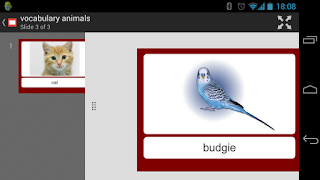
The final step would be to download the flashcards to mobile
devices which can be done in different ways:
- Using the Google Drive app
- Downloading the slides as a file (pdf or pptx)
- Using a browser and the shared URL
In order to permanently store the content on the phone the
first two options are best. Google Drives allows for offline viewing when using
the pin tool in the file menu.


.png)


