Tips on using QR-Codes with weblinks in the classroom. Includes, short reading texts, feedback, listening comprehension and maps.

learning and teaching with free google tools
Posts mit dem Label Blogger werden angezeigt. Alle Posts anzeigen
Posts mit dem Label Blogger werden angezeigt. Alle Posts anzeigen
22.02.12
QR-Codes in the classroom (weblinks)
Tips on using QR-Codes with weblinks in the classroom. Includes, short reading texts, feedback, listening comprehension and maps.


11.09.11
Creating, revising, testing content: learning by Google apps round tripping

- Mobile phones
- Vocabulary for GDocs app
- Google Goggles
- Picasa
- Picasa mobile app
- Google Forms
- Google Spreadsheets
- Blogger
- Google Maps (optional)
- Google Sites (optional)
Creating a (mobile friendly) multiple choice quiz with images or multimedia

- Google Forms
- Google Spreadsheets
- Picasa (optional)
- Blogger
One thing you cannot do in Google form is to use images or html code to embed images, audio files or videos. There is however, a very simple workaround. You create the quiz without images or other multimedia components copy the html code (in the input view right click and show source code which you can then copy starting with the <title> tag, ending just before the </body> tag).
07.09.11
Mindmapping in Moodle or Blogger with Shared Spaces

There is certainly no shortage of mind mapping tools on the web. One of my favorite tools which is also quite popular with students (partly because of its cute animations) is https://bubbl.us/. However, the problem with many web 2.0 mind mapping software like bubbl.us is that it allows you to embed a mindmap in Moodle or Blogger you can make changes only on the apps website itself. That means, that you have to switch back to the app after you have embedded the mindmap without being able to make immediate changes from within Moodle or Blogger.
How to create your own Google Maps data mashup
Ingredients:
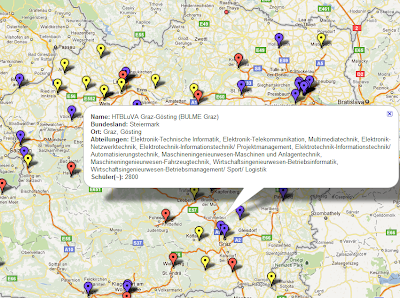 I have already posted about how to put photos on Google Maps and in this post I would like to show how easy it is to put data on a map using Google Fusion Tables. Fusion Tables is a lesser known Google Service and it is not quite as intuitive as other Google Docs. Still it is easier to create a mashup with Fusion Tables than using Yahoo Pipes or using the programming API.
- Google Search
- Google Spreadsheets
 I have already posted about how to put photos on Google Maps and in this post I would like to show how easy it is to put data on a map using Google Fusion Tables. Fusion Tables is a lesser known Google Service and it is not quite as intuitive as other Google Docs. Still it is easier to create a mashup with Fusion Tables than using Yahoo Pipes or using the programming API.
As an example I will use technical colleges in Austria.
05.09.11
Embedding public domain books in Moodle or on a blog

Ingredients:
- Google Books
- Moodle or blog
Google
Books not only lets you read public domain books on your PC or mobile phone,
but you can also embed them in Moodle or on your blog.
Directions:
- In Google Books go to advanced search options and check “full view only”
- Click on the “link” link and you get the embed code, which you copy
02.09.11
New Google Docs look and new features that are useful for students and teachers

Google Docs
has a new look, which you can enable by clicking on the “try the new look” link
above the menu bar (it is always possible to revert to the old look in the help
menu). Google has adopted the new look across the board, i.e. with all major
Google apps including:
- Gmail
- Google Calendar
- Google Docs
- Google Sites
- Blogger

Apart from
the new look, Google Docs also has some new features which are useful for
students and teachers. The two most
useful for teachers and students are probably support for compressed file types
(.zip and .rar), offline viewing of documents and new functions for the web clipboard.
29.08.11
Using audio in Google applications
Google has great photo and video sharing services, however when it comes to audio there is a lot missing. A service like Audioboo or Soundcloud would be really great. Or simply the integration of audio in YouTube – in fact there are a lot of people who convert mp3 to video and upload it to YouTube. Actually, that would be one way of embedding audio into webpages that could be played by iOS devices as the YouTube player is HTML5 enabled.
 Anyway, there is a flash-based Google audio player which interestingly is available at only some Google services. The Google audio player shows up in:

- Gmail – listen to audio files directly from your inbox
- Reader – enables reader to use podcasts RSS feeds in addition to text-based feeds.
Sharing task lists like reading assignments using GQueues and Moodle or class blog

Ingredients:
- Gqueues lite
- Moodle, Blogger, etc.
While Google Tasks is great for personal task management, it has no social features. Gqueues is an app similar to Remember the Milk. In fact, it has the same yearly pricing plan of $25 for the professional version. One important difference is, that you and the people you want to share the tasks with do not need an additional account and Gqueues provides for gadgets for iGoogle and Google Calender (the professional version even syncs with it).
21.08.11
Sharing and embedding (Moodle, blogger, etc.) multiple YouTube videos
YouTube playlists are mostly used by people to, well, play music. Apart from that, they are also great for learning and teaching. Its easy to create and share playlists (using the my videos section on YouTube). But few people know that you can also easily embed them on blogs or on Moodle (see image).

This is particularly useful if a video has got several parts (due to the duration restriction of 15min, or even 10 min. until recently) or if there is a series of videos on a particular subject. I teach a CLIL project management class and I keep a playlist which is exclusively about project management vocabulary.
16.08.11
Making blogger mobile friendly
Whereas most blog services like wordpress.com or tumblr are mobile friendly by default you have to manually set blogger to create a mobile version of your blog. This, however, takes only a few seconds. In your settings go to email&mobile and enable the mobile template (as shown in the picture).
 Publish Post
Abonnieren
Posts (Atom)
Beliebte Posts
-
.png) The number of digital publications has exploded in the past couple of years. And I’m not talking about literature only. Think of manuals fo...
The number of digital publications has exploded in the past couple of years. And I’m not talking about literature only. Think of manuals fo... -
Google Sheets are great for managing students’ gradebooks and keeping all sorts of organisational content for school. However, I find them ...
-
 Update : Google has made it possible to copy the link via right-click menu in the meantime. Just click into the video and right click on the...
 -
At the beginning of this school year I was faced with a novel task: putting the school’s library catalogue online for our students. M...
-
I have been an avid user of Kahoot in the classroom basically ever since this innovative tool has started. However, Kahoot does have its lim...
-
A common problem I hear from teachers is collecting email addresses from their students. Even though the school might provide the students ...
-
For many teachers using Google Drive in class is made more difficult by the fact that not all students use or want to use Google Drive. Mo...
-
 While few people haven’t even heard the name Chromecast yet, Google’s latest device has made quite a splash within the tech scene and has ...
 -
 For the last week I have been using a new Samsung Chromebook in school (not with students, just for myself as a teacher) and it has been mos...


